Build / Account Abstraction
Smart Wallet App with Thirdweb
The Somnia mission is to enable the development of mass-consumer real-time applications. The Somnia Network allows developers to build a unique experience by implementing Smart Contract Wallets with gasless transactions via Account Abstraction (ERC-4337). In this tutorial, we'll use the Thirdweb React SDK to:
- Connect Smart Wallets (Account Abstraction)
- Read Wallet Balance
- Send STT Tokens
Pre-requisites
Before we start, ensure you have:
- Basic knowledge of React
- A Thirdweb account & Client ID
- Node.js & npm installed
Install Dependencies
Run the following command to set up your project:
npx create-next-app@latest somnia-thirdweb
cd somnia-thirdweb
npm install thirdweb ethers viem dotenv
This installs:
thirdweb → The Thirdweb React SDK.
ethers → To interact with blockchain transactions.
dotenv → To securely store API keys.
Create the Thirdweb Client
The Thirdweb client allows the app to communicate with the blockchain. Create a client.ts file and add:
import { createThirdwebClient } from "thirdweb";
export const client = createThirdwebClient({
  clientId: process.env.NEXT_PUBLIC_THIRDWEB_CLIENT_ID as string, // Replace with your actual Client ID
});
Note
Get your Client ID: Register at thirdweb.com/dashboard. 💡
Add Environment Variables
Store API keys in a .env.local file:
NEXT_PUBLIC_THIRDWEB_CLIENT_ID=your-client-id-here
NEXT_PUBLIC_SOMNIA_RPC_URL=https://dream-rpc.somnia.network/
Restart Next.js after modifying .env.local
Build the Account Abstraction App
To ensure Thirdweb Components are available throughout the app, wrap the children's components inside ThirdwebProvider. Modify layout.ts:
import { ThirdwebProvider } from 'thirdweb/react';

<body>
    <ThirdwebProvider>
        {children}
    </ThirdwebProvider>
 </body>
Create & Connect Smart Contract Wallet
The useActiveAccount hook allows us to detect the connected Smart Wallet Account. We use ConnectButton to handle authentication and connection to the blockchain.
import { useActiveAccount } from "thirdweb/react";

const smartAccount = useActiveAccount();

<ConnectButton
  client={client}
  appMetadata={{
    name: "Example App",
    url: "https://example.com",
  }}
/>
This button will connect the user's Smart Contract Wallet and authenticate the user with Thirdweb. After connection, it will also display the wallet address.
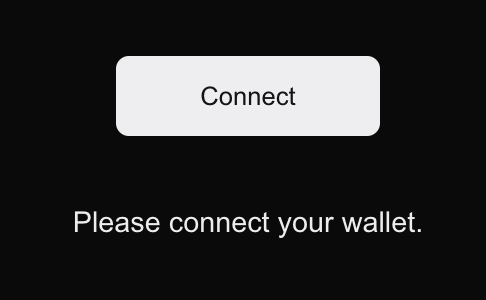
click Connect
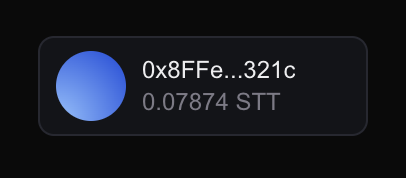
Connected Wallet
To show the connected address, we add the following UI component:
{smartAccount ? (
  <div className="mt-6 p-4 bg-white rounded-lg shadow">
    <p className="text-lg font-semibold text-gray-700">
      Connected as: {smartAccount.address}
    </p>
    {message && <p className="mt-2 text-green-600">{message}</p>}
  </div>
) : (
  <p className="text-lg text-red-600 text-center">
    Please connect your wallet.
  </p>
)}
Token Transfer
The useSendTransaction hook is used to send STT tokens to another address. The function sendTokens will check that the Smart Account is connected and then send 0.01 STT tokens to a recipient address. First, copy your Smart Wallet Address and request for Tokens on Discord in the dev-chat, you can also Transfer some from your EOA.
Log transaction success or failure messages to the console.
import { useSendTransaction } from "thirdweb/react";
import { ethers } from "ethers";

const { mutate: sendTransaction, isPending } = useSendTransaction();

const sendTokens = async () => {
  if (!smartAccount) {
    setMessage("No smart account connected.");
    return;
  }
  console.log("Sending 0.01 STT from:", smartAccount.address);
  sendTransaction(
    {
      to: "0xb6e4fa6ff2873480590c68D9Aa991e5BB14Dbf03",
      value: ethers.parseUnits("0.01", 18),
      chain: somniaTestnet,
      client,
    },
    {
      onSuccess: (receipt) => {
        console.log("Transaction Success:", receipt);
        setMessage(`Sent 0.01 STT! TX: ${receipt.transactionHash}`);
      },
      onError: (error) => {
        console.error("Transaction Failed:", error);
        setMessage("Transaction failed! Check console.");
      },
    }
  );
};
Button Integration
The button UI provides a clear interaction for sending STT tokens. The button shows a loading state (Sending...) when the transaction is pending and displays a success or failure message once the transaction is complete.
const [message, setMessage] = useState<string>('');

<button
  onClick={sendTokens}
  disabled={isPending}
  className={`mt-4 px-6 py-2 rounded-lg ${
    isPending ? 'bg-gray-400 cursor-not-allowed' : 'bg-blue-600 hover:bg-blue-700 text-white'
  }`}
>
  {isPending ? 'Sending...' : 'Send 0.01 STT'}
</button>
{message && <p className='mt-2 text-green-600'>{message}</p>}
Complete Code
'use client';

import { useState } from 'react';
import {
  ConnectButton,
  useActiveAccount,
  useSendTransaction,
} from 'thirdweb/react';
import { ethers } from 'ethers';
import { client } from './client';
import { somniaTestnet } from 'viem/chain';

export default function Home() {
  const [message, setMessage] = useState<string>('');
  const smartAccount = useActiveAccount(); // Get connected account
  const { mutate: sendTransaction, isPending } = useSendTransaction();

  const sendTokens = async () => {
    if (!smartAccount) {
      setMessage('No smart account connected.');
      return;
    }

    console.log('🚀 Sending 0.01 STT from:', smartAccount.address);

    sendTransaction(
      {
        to: '0xb6e4fa6ff2873480590c68D9Aa991e5BB14Dbf03', // Replace
        value: ethers.parseUnits('0.01', 18),
        chain: somniaTestnet,
        client,
      },
      {
        onSuccess: (receipt) => {
          console.log('Transaction Success:', receipt);
          setMessage(`Sent 0.01 STT! TX: ${receipt.transactionHash}`);
        },
        onError: (error) => {
          console.error('Transaction Failed:', error);
          setMessage('Transaction failed! Check console.');
        },
      }
    );
  };

  return (
    <main className='p-4 pb-10 min-h-[100vh] flex items-center justify-center container max-w-screen-lg mx-auto'>
      <div className='py-20'>
        <div className='flex justify-center mb-10'>
          <ConnectButton
            client={client}
            appMetadata={{
              name: 'Example App',
              url: 'https://example.com',
            }}
          />
        </div>

        {smartAccount ? (
          <div className='mt-6 p-4 bg-white rounded-lg shadow'>
            <p className='text-lg font-semibold text-gray-700'>
              Connected as: {smartAccount.address}
            </p>
            <button
              onClick={sendTokens}
              disabled={isPending}
              className={`mt-4 px-6 py-2 rounded-lg ${
                isPending
                  ? 'bg-gray-400 cursor-not-allowed'
                  : 'bg-blue-600 hover:bg-blue-700 text-white'
              }`}
            >
              {isPending ? 'Sending...' : 'Send 0.01 STT'}
            </button>
            {message && <p className='mt-2 text-green-600'>{message}</p>}
          </div>
        ) : (
          <p className='text-lg text-white-600 text-center'>
            Please connect your wallet.
          </p>
        )}
      </div>
    </main>
  );
}
The full implementation includes wallet connection, balance retrieval, and token transfer.
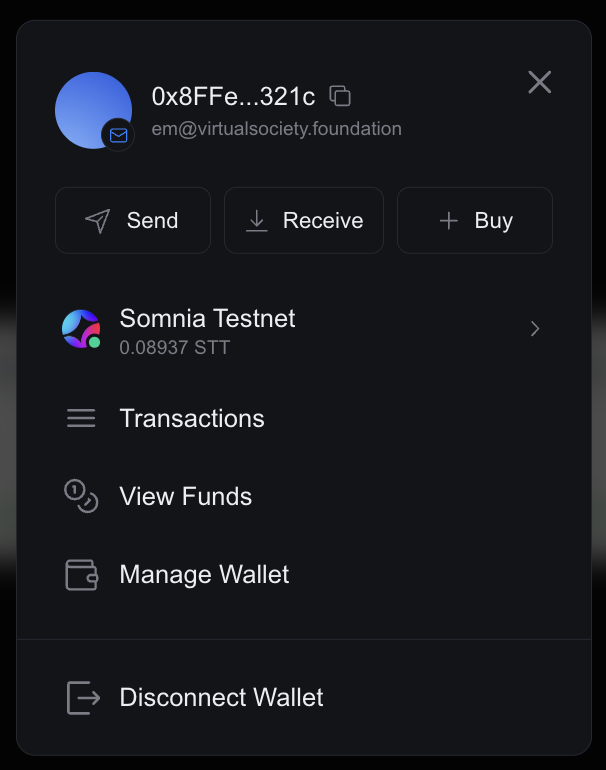
Smart Contract Wallet
Conclusion
Congratulations! 🎉 You have successfully connected a smart contract wallet using Thirdweb. Read wallet balances and Transferred STT tokens on Somnia Testnet. You can explore additional features such as gasless transactions, NFT integration, and DeFi applications.
Copied from docs.somnia.network (somnia-main-docs) by scripts/import-gitbook.mts, until it finds a home in a product's docs.Edit this page