Build / Wallet Integration and Auth
Authenticating with Privy
Privy is a secure, embeddable wallet infrastructure provider that allows developers to authenticate users, manage sessions, and provide seamless wallet experiences within dApps.
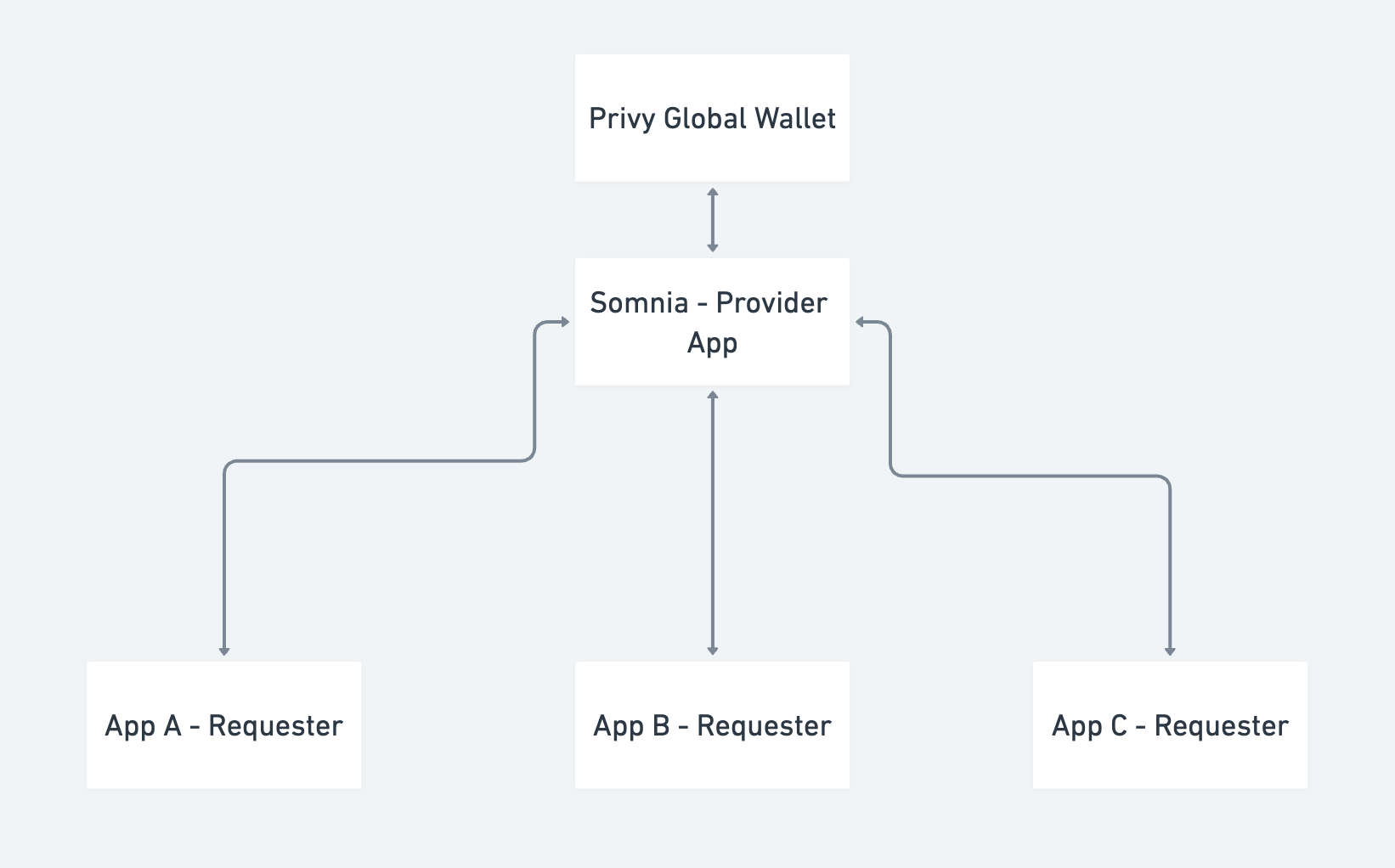
Privy embedded wallets can be made interoperable across apps. Somnia has adopted the global wallets setup to foster a cross-app ecosystem where users can easily port their wallets from one app to another in the Somnia Ecosystem.
Using global wallets, users can seamlessly move assets between different apps and easily prove ownership of, sign messages, or send transactions with their existing wallets. Developers do not have to worry that users will generate a new wallet to sign into different applications. Kindly read more here.
This guide will integrate Privy with the Somnia Testnet, enabling users to create and connect wallets effortlessly.
Prerequisites
- This guide is not an introduction to JavaScript Programming; you are expected to understand JavaScript.
- To complete this guide, sign up for Privy and get an AppID and get the Somnia Provider AppID.
- Familiarity with React and Next.js is assumed.
Installation
Create the Next.js Project
Open your terminal and run the following commands to set up a new Next.js project:
npx create-next-app@latest somnia-privy
cd somnia-privy
Install the necessary packages
npm install @privy-io/react-auth viem
Set Up PrivyProvider
Go to https://dashboard.privy.io/ to set up an account.
Click "New App" to create a new application that will connect to the Somnia Provider AppID.
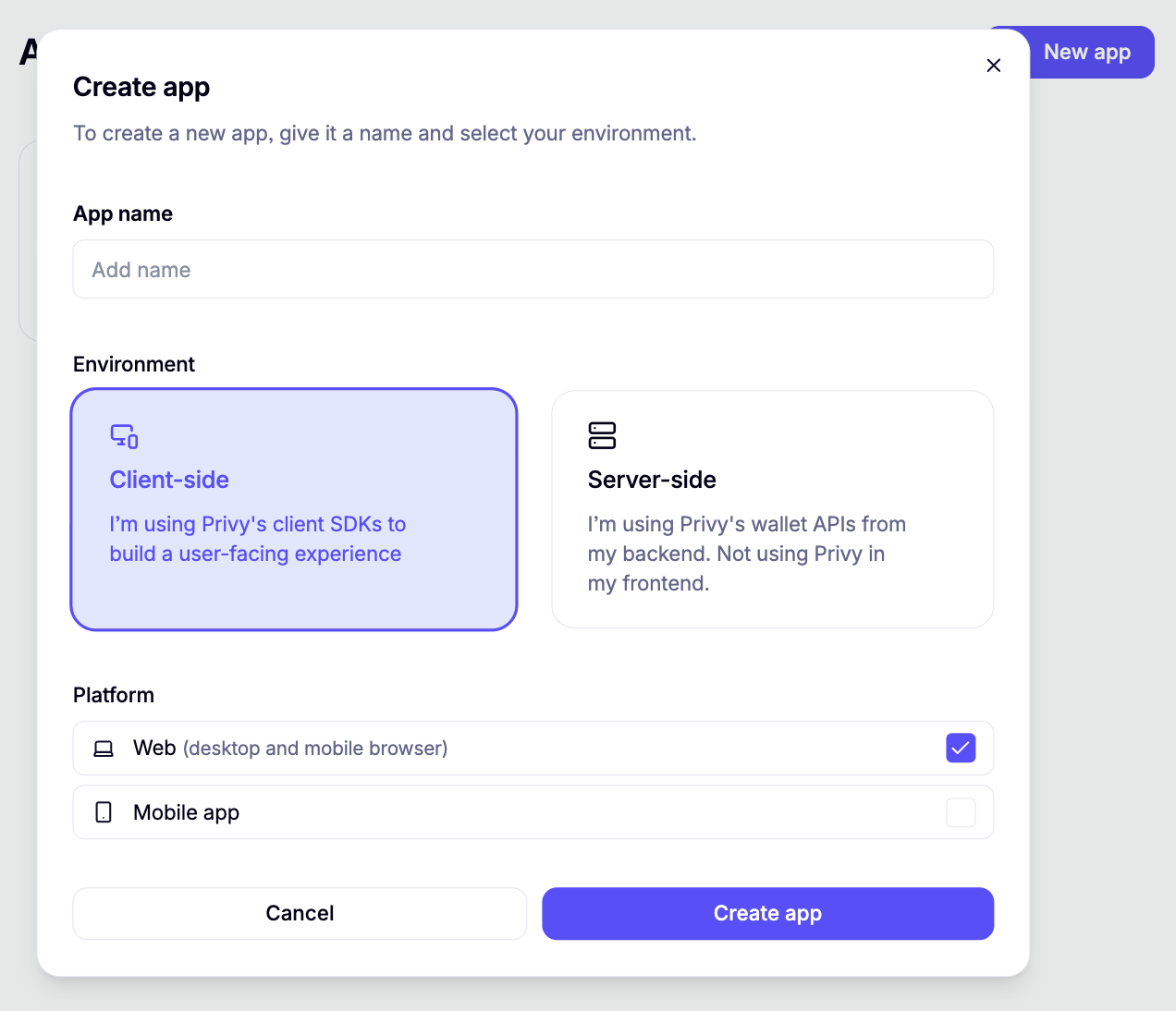
Open the newly created app and in the left side navigation menu navigate to:
User Management >>>> Global Wallet >>>> Integrations
Click the toggle to turn ON the Somnia Provider App.

Wrap your application layout.ts file with PrivyProvider and supply your PrivateKey from Privy and the Somnia Provider App ID to the loginMethods:
'use client';

import { PrivyProvider } from '@privy-io/react-auth';
import { somniaTestnet } from 'viem/chains';

export default function RootLayout({
  children,
}: Readonly<{
  children: React.ReactNode;
}>) {
  return (
    <html lang='en'>
      <body
        className={`${geistSans.variable} ${geistMono.variable} antialiased`}
      >
        <PrivyProvider
          appId={process.env.NEXT_PUBLIC_PRIVY_APP_ID!}
          config={{
            loginMethods: {
              primary: ['email', 'google', 'privy:cm8d9yzp2013kkr612h8ymoq8'],
            },
            defaultChain: somniaTestnet,
            supportedChains: [somniaTestnet],
            embeddedWallets: {
              createOnLogin: 'users-without-wallets',
            },
          }}
        >
          {children}
        </PrivyProvider>
      </body>
    </html>
  );
}
Add your environment variable in .env.local:
NEXT_PUBLIC_PRIVY_APP_ID=your-privy-app-id
Privy Hooks
These hooks make it easy to authenticate users, manage wallets, and interact with the Somnia Network using Privy Global Wallet
import { useCrossAppAccounts, usePrivy } from '@privy-io/react-auth';
Authenticate
Use the provided hooks to authenticate users and access their wallets.
page.tsx
export default function Home() {

  const { loginWithCrossAppAccount } = useCrossAppAccounts();
  const { ready, authenticated, user, logout } = usePrivy();
  const disableLogin = !ready || (ready && authenticated);

  const [loginError, setLoginError] = useState<string | null>(null);
  const [walletAddress, setWalletAddress] = useState<string | null>(null);

  const providerAppId = 'cm8d9yzp2013kkr612h8ymoq8';

  const startCrossAppLogin = async () => {
    try {
      setLoginError(null);
      const result = await loginWithCrossAppAccount({
        appId: providerAppId,
      });
      setWalletAddress(result.wallet?.address)
      console.log(
        'Logged in via global wallet:',
        result,
      );
    } catch (err) {
      console.warn('Cross-app login failed:', err);
      setLoginError('Failed to log in with Global Wallet.');
    }
  };

......

    {!ready ? (
          <p>Loading...</p>
        ) : authenticated ? (
            {walletAddress ? (
              <p>Connected as: {walletAddress}</p>
            ) : (
              <p className='text-gray-600'>No wallet address found.</p>
            )}
            <button
              onClick={logout}
              className='bg-red-600 text-white px-4 py-2 rounded'
            >
              Logout
            </button>
          </div>

        ) : (
          <>
            <button
              onClick={startCrossAppLogin}
              className='bg-purple-600 text-white px-4 py-2 rounded'
            >
              Login with Global Wallet
            </button>
            {loginError && <p className='text-red-500 text-sm'>{loginError}</p>}
          </>          </div>
        )}

}
Send Transactions
Once authenticated, use the useSendTransaction hook from useCrossAppAccount method to interact with Somnia Testnet:
 const { sendTransaction } = useCrossAppAccounts();

 ......

 const sendSTT = async () => {
    if (!walletAddress) return;

     const txn = {
      to: '0xb6e4fa6ff2873480590c68D9Aa991e5BB14Dbf03',
      value: 1000000000000000,
      chainId: 50312,
    };

    try {
      const tx = await sendTransaction(txn, { address: walletAddress });
      console.log('TX Sent:', tx);
    } catch (err) {
      console.error('TXN Failed:', err);
    }
  };

......

 <button onClick={sendSTT}> Send 0.001 STT</button>
Complete Code
Complete page.tsx code
'use client';

import {
  usePrivy,
  useCrossAppAccounts,
} from '@privy-io/react-auth';
import { useEffect, useState } from 'react';
import { createPublicClient, http, formatEther } from 'viem';
import { somniaTestnet } from 'viem/chains';

export default function Home() {
  const { ready, authenticated, user, logout } = usePrivy();
  const { loginWithCrossAppAccount, sendTransaction } = useCrossAppAccounts();

  const [loginError, setLoginError] = useState<string | null>(null);
  const [hydrated, setHydrated] = useState(false);
  const [walletAddress, setWalletAddress] = useState<string | null>(null);
  const [balance, setBalance] = useState<string>('');

  const providerAppId = 'cm8d9yzp2013kkr612h8ymoq8';

  const client = createPublicClient({
    chain: somniaTestnet,
    transport: http(),
  });

  const startCrossAppLogin = async () => {
    try {
      setLoginError(null);
      const result = await loginWithCrossAppAccount({
        appId: providerAppId,
      });
      console.log(
        'Logged in via global wallet:',
        result,
      );
    } catch (err) {
      console.warn('Cross-app login failed:', err);
      setLoginError('Failed to log in with Global Wallet.');
    }
  };

  useEffect(() => {
    if (authenticated) {
      const globalWallet = user?.linkedAccounts?.find(
        (account) =>
          account.type === 'cross_app' &&
          account.providerApp?.id === providerAppId
      );

      console.log(globalWallet);
      const wallet = globalWallet?.smartWallets?.[0];
      console.log(wallet);
      if (wallet?.address) {
        setWalletAddress(wallet.address);
        setHydrated(true);
        fetchBalance(wallet.address);
      } else if (user?.wallet?.address) {
        setWalletAddress(user.wallet.address);
        setHydrated(true);
        fetchBalance(user.wallet.address);
      } else {
        setHydrated(true);
      }
    }
  }, [authenticated, user]);

  const fetchBalance = async (address: string) => {
    try {
      const result = await client.getBalance({
        address: address as `0x${string}`,
      });
      const formatted = parseFloat(formatEther(result)).toFixed(3);
      setBalance(formatted);
    } catch (err) {
      console.error('Failed to fetch balance:', err);
    }
  };

  const sendSTT = async () => {
    if (!walletAddress) return;
    console.log(walletAddress);

   const txn = {
      to: '0xb6e4fa6ff2873480590c68D9Aa991e5BB14Dbf03',
      value: 1000000000000000,
      chainId: 50312,
    };

    try {
      const tx = await sendTransaction(txn, { address: walletAddress });
      console.log('TX Sent:', tx);
      if (walletAddress) fetchBalance(walletAddress);
    } catch (err) {
      console.error('TXN Failed:', err);
    }
  };

  return (
    <div className='grid min-h-screen items-center justify-items-center p-8 sm:p-20'>
      <main className='flex flex-col gap-6 row-start-2 items-center'>
        {!ready ? (
          <p>Loading...</p>
        ) : !authenticated ? (
          <>
            <button
              onClick={startCrossAppLogin}
              className='bg-purple-600 text-white px-4 py-2 rounded'
            >
              Login with Global Wallet
            </button>
            {loginError && <p className='text-red-500 text-sm'>{loginError}</p>}
          </>
        ) : hydrated ? (
          <div className='space-y-4 text-center'>
            {walletAddress ? (
              <p>Connected as: {walletAddress}</p>
            ) : (
              <p className='text-gray-600'>No wallet address found.</p>
            )}
            <p>Balance: {balance ? `${balance} STT` : 'Loading...'} </p>
            <button
              onClick={sendSTT}
              className='bg-blue-600 text-white px-4 py-2 rounded'
            >
              Send 0.001 STT
            </button>
            <button
              onClick={logout}
              className='bg-red-600 text-white px-4 py-2 rounded'
            >
              Logout
            </button>
          </div>
        ) : (
          <p>🔄 Logging in... Please wait</p>
        )}
      </main>
    </div>
  );
}
By using Privy Global Wallet on the Somnia Testnet, developers can offer a seamless onboarding and wallet experience. This setup is ideal for onboarding Web2 users into Web3 with embedded wallets, abstracting away traditional wallet complexities.
Copied from docs.somnia.network (somnia-main-docs) by scripts/import-gitbook.mts, until it finds a home in a product's docs.Edit this page